Sep 4, 2026
Find Instagram Account by Email (Reverse Lookup 2026)
Instagram doesn't support email search. Use Google "email@example.com" in quotes, check LinkedIn profiles, or try reverse lookup tools (20-40% success rate).
 Rena Sato 佐藤玲奈761 words4 min read
Instagram doesn't allow searching accounts by email address. The workaround: Google the email in quotes ("email@example.com"), check their LinkedIn for an Instagram link, or use a reverse lookup tool (20-40% success rate, only finds publicly linked accounts).
This limitation exists by design—Instagram prioritizes user privacy. If you're verifying a partnership email or finding a contact's profile, these 3 methods work for publicly available connections only.
Key Takeaways
• Instagram's official policy: no email-based account search
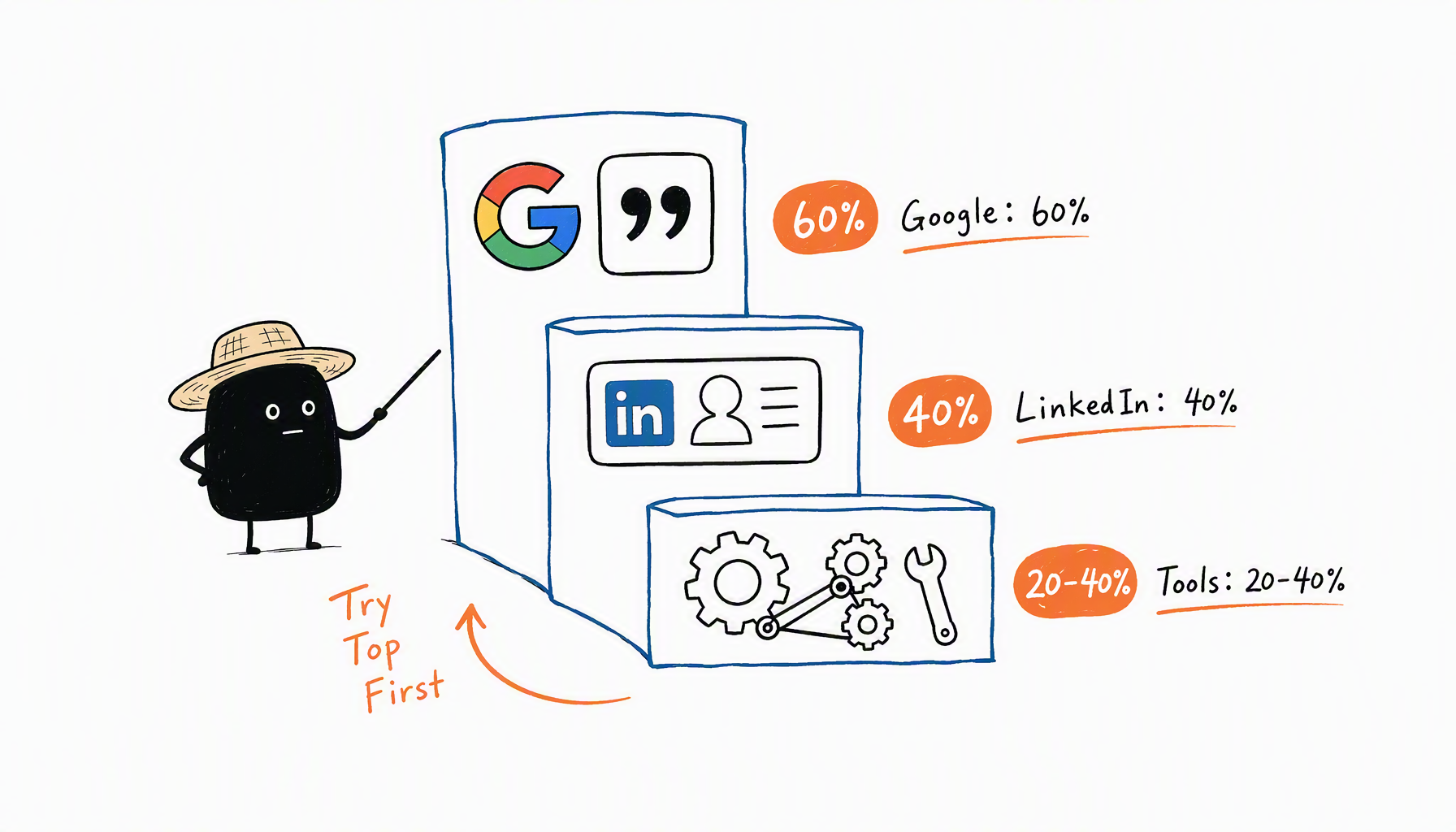
• Best method: Google search in quotes (60% success rate for public emails)
• Reverse lookup tools exist but have 20-40% accuracy (only public links)
Why Instagram Doesn't Support Email Search
Instagram intentionally blocks email-based search to protect user privacy. The app only allows searching by:
- Username (@handle)
- Display name
- Linked phone number (if added to contacts)
Email addresses are never searchable, even for Business accounts. Instagram Help Center confirms this.
3 Methods to Find Instagram by Email
Method 1: Google Search in Quotes (Best Success Rate)
Search Google with the email address in quotes:
Why it works: If the person lists their email publicly (on their website, LinkedIn, YouTube About page, or link-in-bio), Google indexes it alongside their Instagram profile link.
Success rate: ~60% for publicly listed emails.
Example: Searching "partnerships@beautybysarah.com" returns her Linktree page, which links to her Instagram @beautybysarah.
Method 2: Check LinkedIn Profile
If you know the person's LinkedIn:
- Open their LinkedIn profile
- Scroll to the Contact Info section (click "Contact info" below their name)
- Look for a linked Instagram account
Why it works: Many professionals link their Instagram in LinkedIn's "Websites" section.
Success rate: ~40% for LinkedIn users who actively maintain their profile.
Note: This requires knowing their LinkedIn first—it's a manual cross-reference, not an automated reverse search.
Method 3: Use Reverse Lookup Tools
Tools like Social Catfish, Spokeo, or reverse email search services claim to find social accounts from email addresses.
Reality check: These tools scan public databases for email-to-social-profile connections. They only work if:
- The person publicly linked their email to Instagram (rare)
- The email appears in a data breach that cross-referenced social profiles (ethical gray area)
Success rate: 20-40% at best. Most results are outdated or inaccurate.
When to use: As a last resort after Google and LinkedIn fail. Don't pay for these tools unless you've exhausted free methods.
What If None of These Work?
Option 1: Ask directly
If you have their email, just ask: "What's your Instagram handle?" Most people reply within 24 hours.
Option 2: Check mutual connections
If you have shared contacts, ask them for the Instagram handle.
Option 3: Search other platforms
Try the email on Twitter/X, Facebook, or YouTube. People often use the same email across platforms and link their Instagram in bios.
Real scenario: When Jake received a collaboration email from "influencer@beautyguru.com," he Googled it in quotes. The first result was a link-in-bio page listing Instagram @beautyguru\_official. He verified the follower count matched the email's claimed reach. The reverse confirmed the partnership was legitimate, not a scam.
Why Reverse Lookup Has Low Success Rates
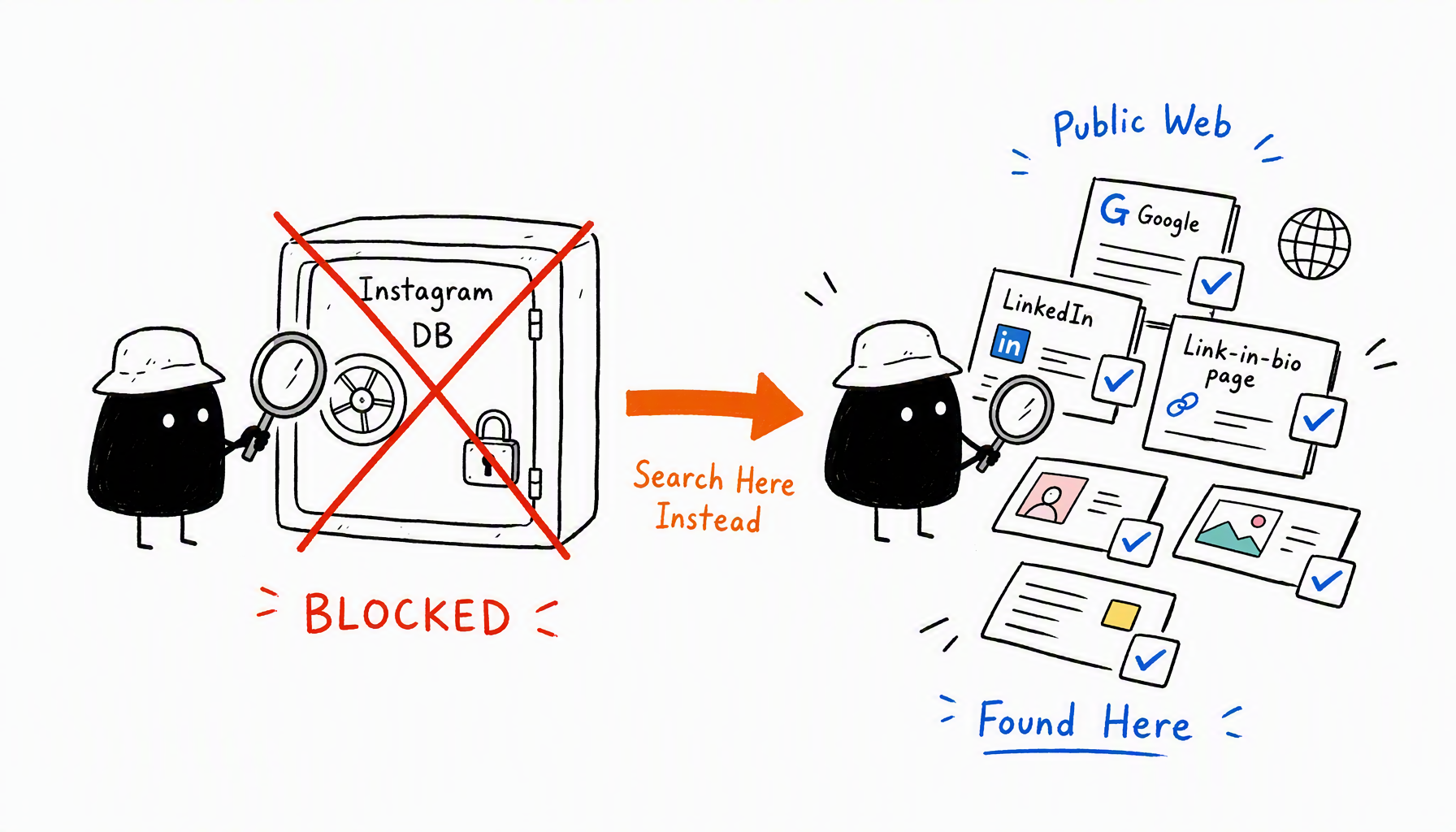
Instagram's API doesn't expose email-to-account mappings. Tools can only find accounts if:
- The email is publicly listed on the Instagram bio (rare—most creators use Contact buttons, not public text)
- The email appears on a linked website or Linktree that Google indexed
- The person manually linked Instagram to other public profiles (LinkedIn, personal site)
Bottom line: You're not searching Instagram's database—you're searching the public web for cross-references. Success depends on how publicly the person shares their info. Professional influencer scouts use cross-platform matching to find contacts even when Instagram info is hidden.
Conclusion
Instagram blocks email-based account search by design. Your best options: Google the email in quotes (60% success rate), check LinkedIn for linked accounts (40%), or try reverse lookup tools as a last resort (20-40%, often inaccurate).
If you're verifying a partnership email, Google search + LinkedIn cross-check usually works. If you're trying to find someone's private account, the success rate drops near zero—Instagram designed it that way.
Next steps:
- Google "email@example.com" in quotes
- Check their LinkedIn Contact Info for Instagram link
- If it's for partnership verification, just ask directly
Need to go the other direction? Learn how to find someone's email from their Instagram account. Or compare Instagram email finder tools for automated options.
Want to find creator emails at scale? Try CreatiVault's free Instagram email finder—unlimited searches, no credit card required.
 Sophie Klein